


For QA and developers tired of vague bug reports
Blurry bug reportswaste hours.BugSnap solvesthem in seconds.
Capture your screen with automatic console errors, failed network requests, and system specs attached. Stored directly in your Google Drive.
 Add to Chrome
 Add to Firefox


Free to use · No credit card required
 Pay $2,499.00
 Captured error state
 Saved to Google Drive


RESULTS YOU CAN MEASURE
Fewer tabs. Zero back-and-forth.Bugs solved on the first pass.
Live Product Walkthrough
See BugSnap in action: from trigger to fix in 3 seconds
Watch how BugSnap captures your screen, extracts console errors and network failures, and stores everything in your Google Drive.
Simulating user checkout error click...
See the latest BugSnap interface in action
Real screenshots from the current extension, visual editor, DevTools viewer, and team dashboard.
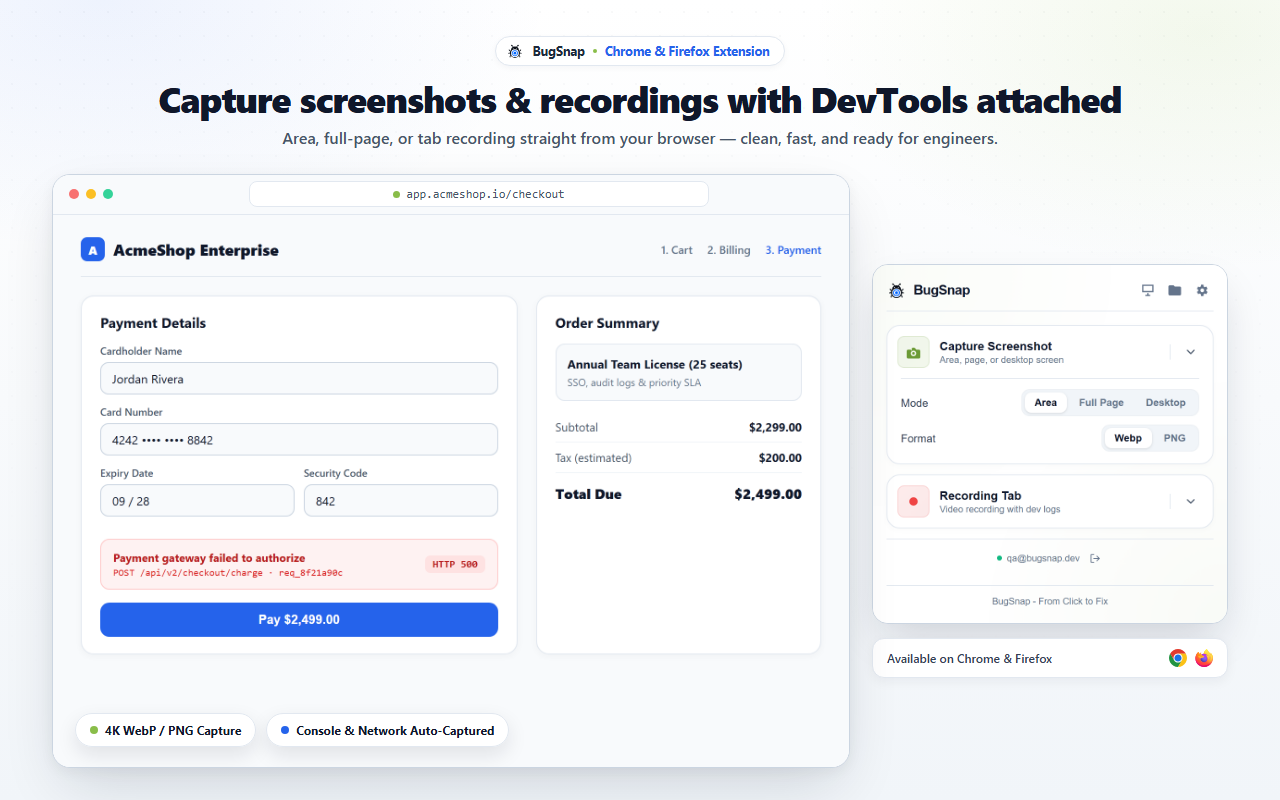
Capture screenshots or record browser tabs straight from Chrome and Firefox.
See the result
What your developer receives instantly
Open one link. Every diagnostic is already there, zero follow-up needed.
Why teams switch
Screenshots lack context. BugSnap delivers the root cause.
The Traditional Way
Vague screenshots and endless guessing games.
- QA shares a blurry screenshot in Slack with 'it’s broken'.
- Dev asks: what browser? Can you inspect console? What’s the payload?
- Hours wasted trying to reproduce edge-case bugs across environments.
With BugSnap
Screenshots or screen recordings with DevTools diagnostics.
- Video with mic audio and on-canvas annotations.
- Console errors, network 4xx/5xx, and system specs attached silently.
- Stored in your own Google Drive. Zero server storage fees, forever.
Before vs After
From 47-minute Slack threads to 1 link
See exactly what changes when your team uses BugSnap.
 The Old Way

• • •
 With BugSnap
 Recording (14s) - auto-attached
 Console: 2 errors captured automatically
 Network: POST /api/payment 500 (cURL ready)System: Chrome 124 · macOS · 1280×720
 bugsnap.akusaraproject.my.id/v/8f921a
 1 link sent · dev reproduced in 3 min
EVERY TEAM, A CLEARER PATH
Every role gets exactly what they need
QA testers, developers, and PMs each see a different value: BugSnap delivers all three.
QA & TESTERS
Find and report bugs faster.
Share blurry screenshots and explain the issue multiple times.
Record once. Never type repro steps again.
Capture your screen, console errors, network requests, and system specs in seconds. Everything is saved to your Google Drive.
- Video with optional mic audio and annotations
- Console errors, network 4xx/5xx, and system specs automatically captured
- Share a complete, reproducible report in seconds
SOFTWARE ENGINEERS
Get full context. Fix issues faster.
Chase for logs, network info, and environment details.
Full stack trace & network payload in the first message.
No more asking for "what's the browser?" or "can you open the console?". Every report includes the complete context you need to reproduce and fix the issue.
- Console errors with stack traces
- Network requests with headers and payload
- Environment details (browser, OS, screen size, etc.)
PRODUCT MANAGERS
Turn reports into action.
Vague reports make it hard to prioritize and track progress.
Turn a Slack report into a sprint ticket.
Get clear, reproducible reports with all the context attached. Send to your issue tracker and keep the team aligned without manual follow-ups.
- Convert to Jira, Linear, GitHub, Slack, and more
- Complete technical context for faster triage
- Keep everyone aligned with a single source of truth
DIRECT TEAM HANDOFF
How the whole team collaborates in BugSnap
PRODUCT WORKFLOW
From reproduction to resolution without back-and-forth.
Six simple steps that take your team from noticing a bug to deploying a verified fix in minutes, not days.
Screenshot & Screen Record
Capture a screenshot or record your screen in the browser, with console logs, network requests, and system specs collected automatically.
Direct to Google Drive
Video and telemetry stream straight to your own Google Drive via client-side OAuth. Zero server retention.
AI Root Cause Analysis
BugSnap AI analyzes the console errors, stack traces, and network failures to pinpoint the exact root cause in seconds.

Instant Shareable Link
Generate a secure, tokenized link with full DevTools replay. No accounts or software required for viewers.

MCP for AI Coding Agents
Feed the bug report directly to Claude Code, Cursor, or Windsurf via our Model Context Protocol server for instant reproduction.
Fix, Verify & Close
Engineers reproduce locally in minutes, write the fix, and verify against the original capture before closing the ticket.
Capabilities
A clear path from browser evidence to a fix
Capture what happened, keep the files in your Google Drive, and give engineers the context to act.
Screenshots and Screen Recordings
Take a precise screenshot or record a screen, window, or tab with microphone audio and click context. Choose the capture mode that fits the bug.
Console and Network Evidence
See failed requests, response details, console errors, and source-mapped stack traces beside the visual capture.
Mark Up and Compare Visual Changes
Point to the exact detail with annotations, crop the frame, blur sensitive data, or compare two screenshots with the split view.

Files Stay in Your Google Drive
Screenshots and screen recordings go to the connected Google Drive folder, so your team keeps control of the media files.

SPA Health Signals
Track heap growth, DOM nodes, and long-running work across route changes to spot health problems before they become another bug report.
/checkout to /order.Turn Reproduction Steps into Tests
Use captured actions to draft @playwright/test coverage, then let your coding assistant read the same report through MCP.
test('reproduce checkout button failure', async ({ page }) => {
  await page.goto('/checkout');
  await page.getByRole('button', { name: 'Apply Promo' }).click();
  await page.locator('#coupon').fill('DISCOUNT50');
  await page.getByRole('button', { name: 'Pay' }).click();
  await expect(page.locator('.toast-error')).toBeVisible();
});
ZERO-DATA ARCHITECTURE
Your files never touch our servers. Period.
BugSnap is architected from day one so that video recordings, screenshots, and replay data stream directly from your browser to your own Google Drive. We only store encrypted metadata.
Your Browser
Captures video, audio, console & network l-s locally
Your Google Drive
All videos, screenshots, and telemetry stored in your own Drive


BugSnap Cloud
Encrypted IDs, timestamps, and permissions — zero media bytes
Your Browser
Captures video, audio, console & network l-s locally
Your Google Drive
All videos, screenshots, and telemetry stored in your own Drive
BugSnap Cloud
Encrypted IDs, timestamps, and permissions — zero media bytes
Built for your actual stack
Native integrations with the trackers you already use
Push structured markdown reports with attached DevTools logs directly into your engineering workflow.
Reproduction Video & Context:
▶ https://bugsnap.akusaraproject.my.id/v/8f921a (00:14)
Console Error:
Uncaught TypeError: Cannot read properties of undefined (reading 'token')
at CheckoutButton.tsx:42:18
FREQUENTLY ASKED QUESTIONS
Got questions? We've got answers.
Everything you need to know about how BugSnap works, pricing, privacy, and team onboarding.
Read the full documentationSTART BUG HUNTING IN SECONDS
Catch the next bug with full context.
Install the free Chrome extension and record your first bug in under 30 seconds. No credit card, no complex setup.
Free forever for core features · Installs in 30 seconds · No credit card required